First Workflow
This path uses the published
deterministic-smoke-workflow.yaml
fixture. It transforms the required JSON payload into the declared JSON
normalized output, then stops successfully. It has no model, agent, skill,
tool, connector, HTTP, extension, child-workflow, schedule, webhook, or other
external effect.
Import preflight alone does not prove readiness or execution. Follow the full sequence below and check the final output value, not only the job status.
Roles and prerequisites
- An administrator imports, reviews, binds, enables, and can use builder Test Run. The builder route is currently administrator-only.
- An operator can launch the administrator-provisioned enabled workflow through the API, MCP, or a configured trigger and inspect its durable job. An operator must not be directed into the guarded builder route.
- Use a disposable project with no notification routes or external connections. Record its project ID for the API tutorial.
1. Inspect the fixture
Download the YAML and verify these exact contracts before import:
| Contract | Value |
|---|---|
| Workflow ID | docs_deterministic_smoke_v1 |
| Required input | payload (json), containing {"message":"hello"} |
| Required output | normalized (json) |
| Step | transform reads state.inputs.payload, copies its message field, and writes state.normalized |
| Terminal | stop_success |
| Import state | Draft and disabled |
The fixture declares empty dependency lists. Do not add models, tools, or connections merely to complete this smoke test.
2. Import and bind as an administrator
- Open Registry → Workflows and choose Import YAML.
- Select the disposable project. Import resolves project-owned connections and other dependencies against this project context.
- Upload
deterministic-smoke-workflow.yaml. - Run import preflight. Confirm there are no unresolved dependencies and the
target ID is
docs_deterministic_smoke_v1(or record a conflict-renamed ID). - Apply the import as a draft.
- Open the imported workflow and confirm the two steps and callable interface match the table above.
- Confirm the disposable project binding.
- Check workflow validation/readiness. Resolve any errors before enabling the reviewed provider-free fixture.
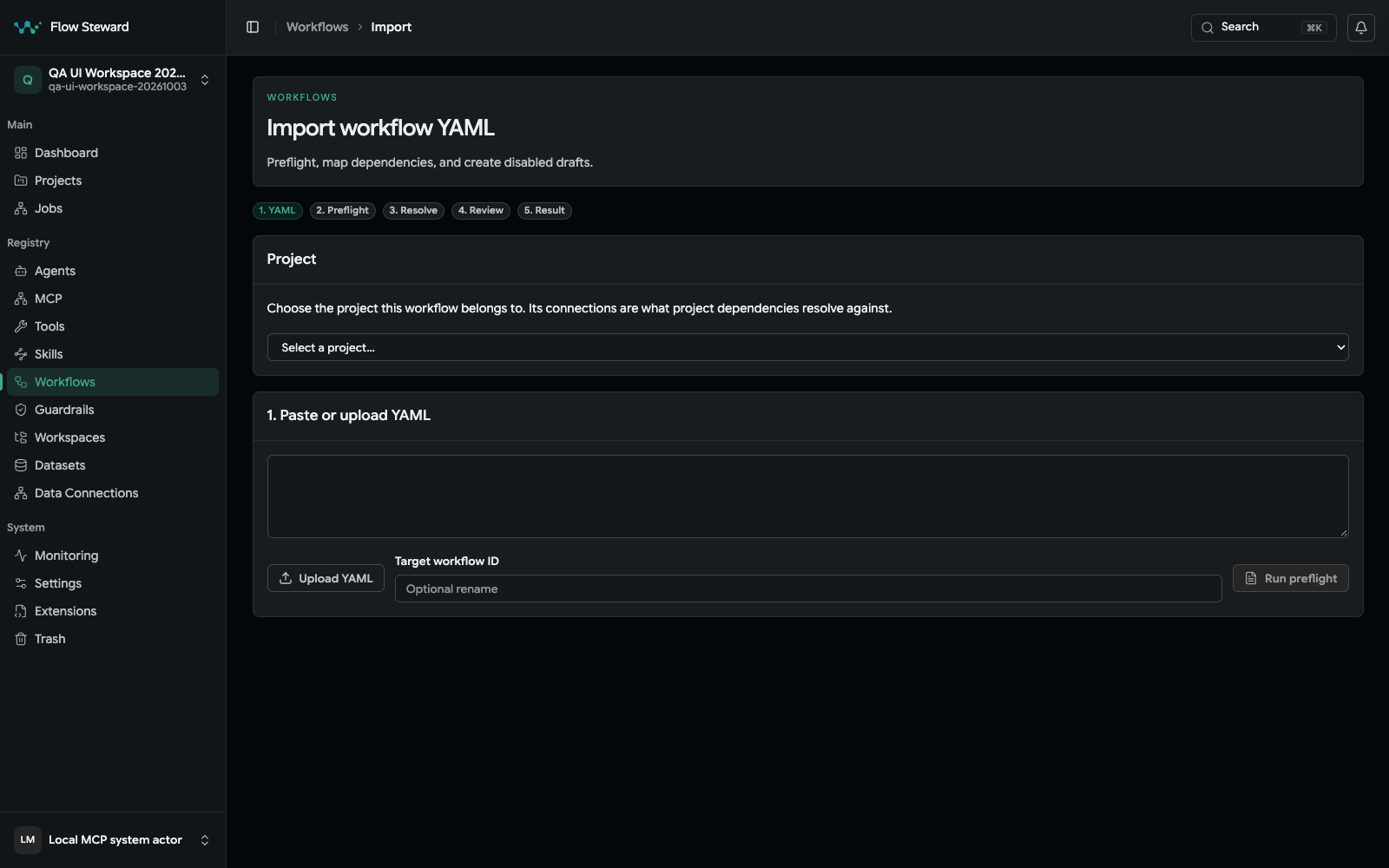
The current import entry screen. No file was uploaded in this capture. The separate builder/Test Run screenshot elsewhere uses a synthetic QA workflow; it is not evidence that this downloadable tutorial fixture was imported or executed.
Validation/preflight does not execute the workflow. The backend rejects an
actual Test Run of a disabled workflow with HTTP 422, Disabled workflow cannot be test-run. Because this fixture exposes exactly the ui, api, and mcp
trigger channels and has no
external-effect steps, an administrator may enable it after review for this
controlled test. Do not generalize this sequence to imported workflows with
webhooks, schedules, connectors, HTTP calls, or other triggers.
3. Run the administrator Test Run
- Open the workflow Overview, then choose Test Run. This opens the administrator-only builder route.
- Select the disposable project and link it if prompted.
- Enter
{"message":"hello"}for the required JSONpayloadinput. - Submit the Test Run once.
The endpoint accepts a durable execution asynchronously and returns a job ID. The current surface embeds Job Details for that job; use its full Job Details link when you need the complete record. Inspect status, phase/step evidence, errors, logs, artifacts, and output variables there. The expected terminal output is:
{
  "normalized": {
    "message": "hello"
  }
}
If a gate is added later, its job panel supplies gate-specific decision labels; the fixture itself has no approval gate. The older Latest workflow test run panel is a fallback branch when no durable job ID is available, not the normal success destination.
4. Start through the public API or MCP
After an administrator has imported, bound, reviewed, and enabled the fixture,
use the Public API Quick Start with its
project UUID, workflow ID, and inputs: {"payload":{"message":"hello"}}.
The workflow must admit the mcp trigger channel. MCP clients can use
workflow_trigger with payload: {"payload":{"message":"hello"}}: the outer
payload is the tool argument; the inner one is this workflow's input field.
Follow the returned job under Jobs and verify normalized.message equals hello.
test_mode is not a general external-effect sandbox; the fixture's authored
graph is provider-free.
Diagnose a mismatch
- Import errors: compare the downloaded file with the documented workflow ID, typed interface, empty dependencies, and two steps.
- HTTP 422 on Test Run: confirm the workflow is enabled; do not enable a different effectful workflow just to bypass the guard.
- Missing input: the callable contract is strict and requires JSON
payload. - No output: inspect
normalize_message; its result target isstate.normalizedand source isstate.inputs.payload. The submitted payload must containmessage. - Authorization failure: Test Run requires an administrator; use the pre-provisioned API/MCP launch path as an operator.
Cleanup
Disable the fixture first. Review its project binding and retained job evidence, then use the administrator-approved deletion lifecycle. Project deletion is not part of the public API allowlist. Preserve any evidence required by your retention policy before removing the disposable objects.